Where it usually gets stuck in a team
In a team of ten, things rarely go wrong with one person. They go wrong in the sum: hours that come in a week late, lines without a description, leave kept in a separate list and rides nobody bills on. At the end of the month someone is piecing it all together for the invoices.
Half5 brings that together in one registration. Each employee sees in their own Timeline what they forgot to register, and you see the week they submit.
Weekly approval, with four eyes
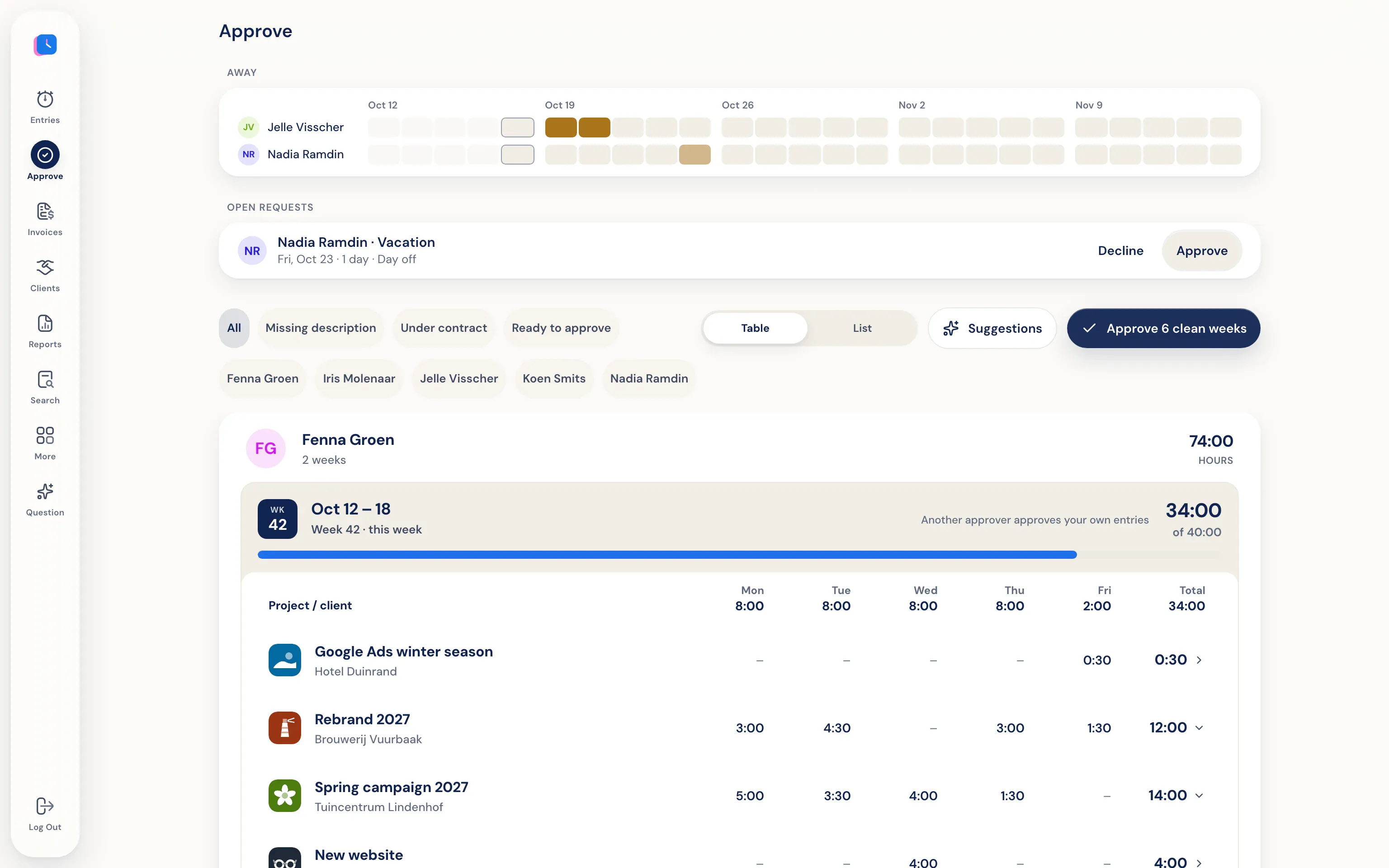
Per employee you see the registered hours of the week, with leave and rides alongside. If the week is right, you approve it in one go. If a line is wrong, you decline it with a reason the employee sees on that line. A week with fewer hours than the contract and hours without a description are flagged.
Nobody approves their own hours, unless they are the only approver. With approval turned on, only approved hours end up on an invoice. Rides only go through approval when money is involved. More in hour approval.
Roles and departments
Admins see and manage the whole organisation. A department manager sees and approves the registrations of their own department. Employees only see their own hours. Per employee you set working days and a rate, so someone who works four days isn't measured against a five-day week.
Leave is requested in the same app: a day, half a day or a few hours. The request sits at the top of approval, next to who is already off in those weeks.
From approved hours to invoice and report
From approved hours you create draft invoices per client, which you send from Half5 or pass on to Moneybird, WeFact, e-Boekhouden or Exact Online. In the reports you see per client, project, employee and activity where the time went, which project is going over budget and what still needs to be invoiced.
You see what someone registers. Not what someone did.
-
The Timeline belongs to the employee
Encrypted with a key that exists only on their own devices. Not even an admin can open it.
-
No screenshots
Half5 takes no screenshots and records no keystrokes.
-
Amounts only for those allowed to see them
You choose whether department managers see revenue and rates, or only hours.
Frequently asked questions
As an employer, can I see what my employees do on their computer?
No. Only the employee can open the Timeline with programs and websites. You see the hours, leave and rides they register and submit.
Is approval required?
No, it is turned on or off per organisation. Without approval you create invoices from all saved hours.
What does it cost for a team?
You pay per user per month; the prices are on the pricing page. From 50 users, email what you need and you'll receive a proposal by email.
How does a team get started?
You create an account, invite your colleagues and set up roles, working days and rates. The first 30 days are free. You don't need a demo or a call.
More about Half5
- Automatic time tracking Your Timeline suggests hours, you confirm
- Time tracking app Hours, rides and leave on desktop, phone and web
- Mileage tracker app Rides and kilometres prepared for you
- Time tracking for freelancers Hours, rides and invoices for the self-employed
- Employees Roles, working days and rates
- Hour approval One quiet moment per week
- By industry Agencies, installers, lawyers and more