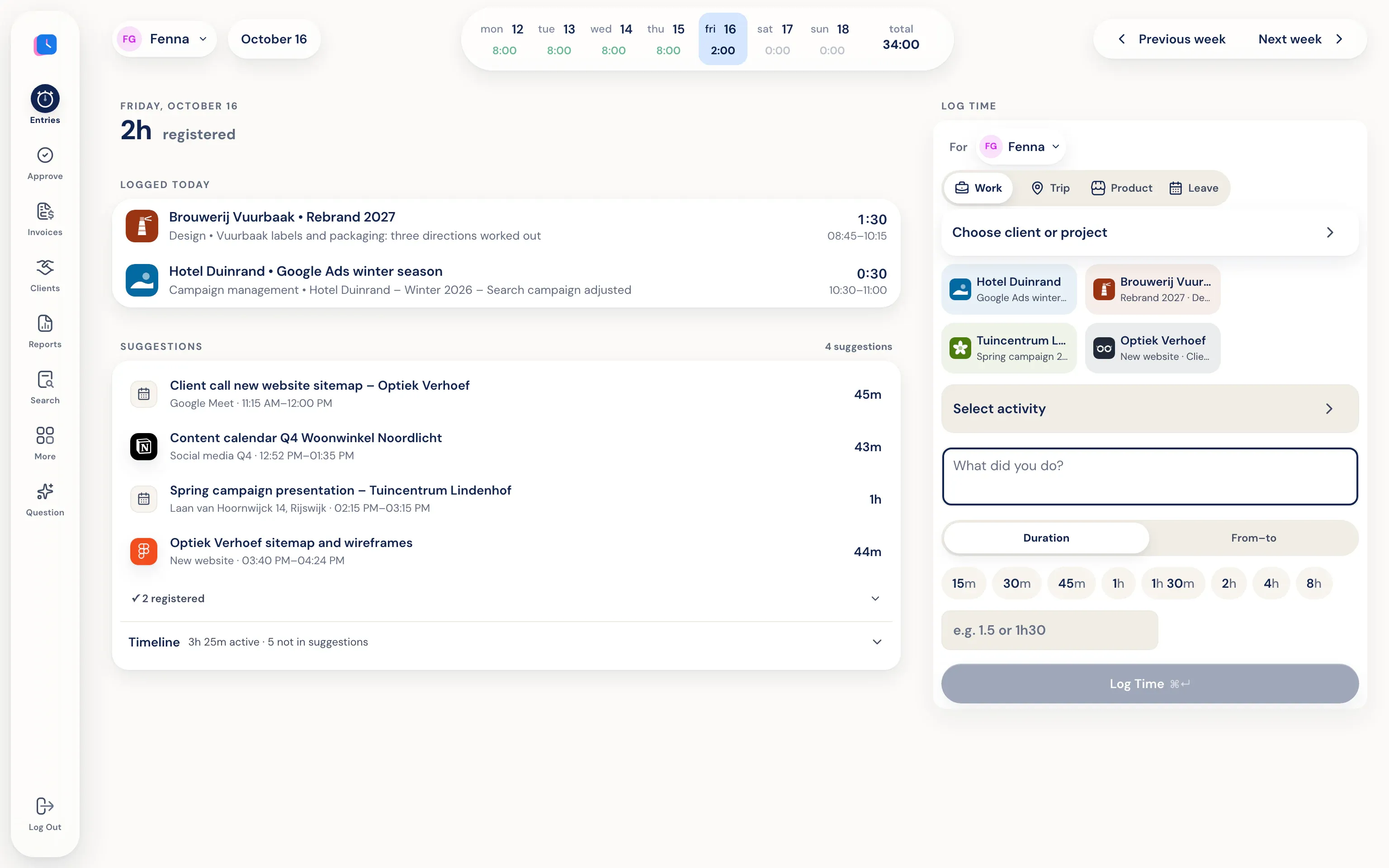
What Half5 tracks automatically
At Half5, automatic means collecting signals—not making decisions for you. Each source adds details to your private Timeline:
- Your computer: The desktop app for macOS and Windows tracks which programs, window titles, websites and files were open, plus any git commits and sessions in Claude Code, Codex or Cursor.
- Your calendar: Events from Google Calendar or Outlook.
- Your phone: The app for iPhone and Android detects trips and visits.
- Your phone calls: Half5 Belletjes on Android logs business calls—number, contact, and duration. Never the content.
From signals to hours
Half5 turns those signals into work blocks and figures out which client and project they belong to. That matching happens right on your device. When you pick a suggestion, the client, project and time are already filled in. You can fix anything that's off and save. Anything that's not work, just leave it out.
You can also have a description written for you: either with a local model on your computer, or a cloud model if you give permission. Details are in automatic time registration.
A memory aid, not a monitoring tool
Most automatic time tracking tools are built for managers. Half5 isn't. Your Timeline activity is end-to-end encrypted; only your devices have the key. Your boss, your manager, and Half5's server can't read it. No screenshots, no keystroke logging.
Add your banking app or personal email to an exceptions list and they won't show up in your Timeline. You also decide how long old activity sticks around: a month, a quarter, a year, or never. Your manager only sees the hours you save and submit.
What it doesn't do
Half5 never books hours without you, and doesn't decide what's billable. Without the desktop app, Half5 can't see programs or websites; suggestions will come from your calendar, trips, and calls. The automatic Timeline with suggestions is included in the Premium plan; see pricing.
Great for days full of small tasks.
-
Work for multiple clients
Agencies, consultants, and developers who bill by client and switch between them.
-
Lots of calls and driving
Calls and trips show up alongside your work blocks, so nothing gets missed.
-
Working with AI agents
Sessions in Claude Code, Codex, and Cursor appear on your Timeline. Through MCP, an agent can also log hours itself, which stay open until you approve them.
Frequently asked questions
Can my employer see which websites I visit?
No. Your Timeline is end-to-end encrypted and only you can access it. Your employer only sees the hours, trips, and leave you record.
Are hours booked automatically?
No. Half5 only suggests entries. An hour is only booked when you save it. Only an AI agent you connect yourself through MCP can create hours, and those stay open until you approve them.
Does it work without the desktop app?
Yes. You can log time on the web or your phone, with suggestions from your calendar, trips, and calls. Only the desktop app for Mac and Windows can track programs and websites.
Which plan includes the automatic Timeline?
Premium. Basic includes hours, trips, leave, projects, and invoices; the automatic Timeline that helps you find missed work is part of Premium.
More about Half5
- Time tracking app Track hours, mileage, and leave on desktop, phone, and web
- Time tracking for teams Weekly approval, departments, and invoices
- Time Tracking for Freelancers Hours, mileage, and invoices for the self-employed
- Mileage tracker app Trips and miles prepared for you
- The Timeline What's included and who can see what
- Trust center Encryption, storage, and subprocessors
- AI agents (MCP) Log hours from Claude, ChatGPT, Codex, or Cursor