Why most time tracking fails after the fact
Logging hours isn’t hard. The problem is, you do it Friday afternoon, from memory. The quick call, the quote you checked in between, and the twenty minutes on a bug get lost. If you use a stopwatch, you forget to start or stop it.
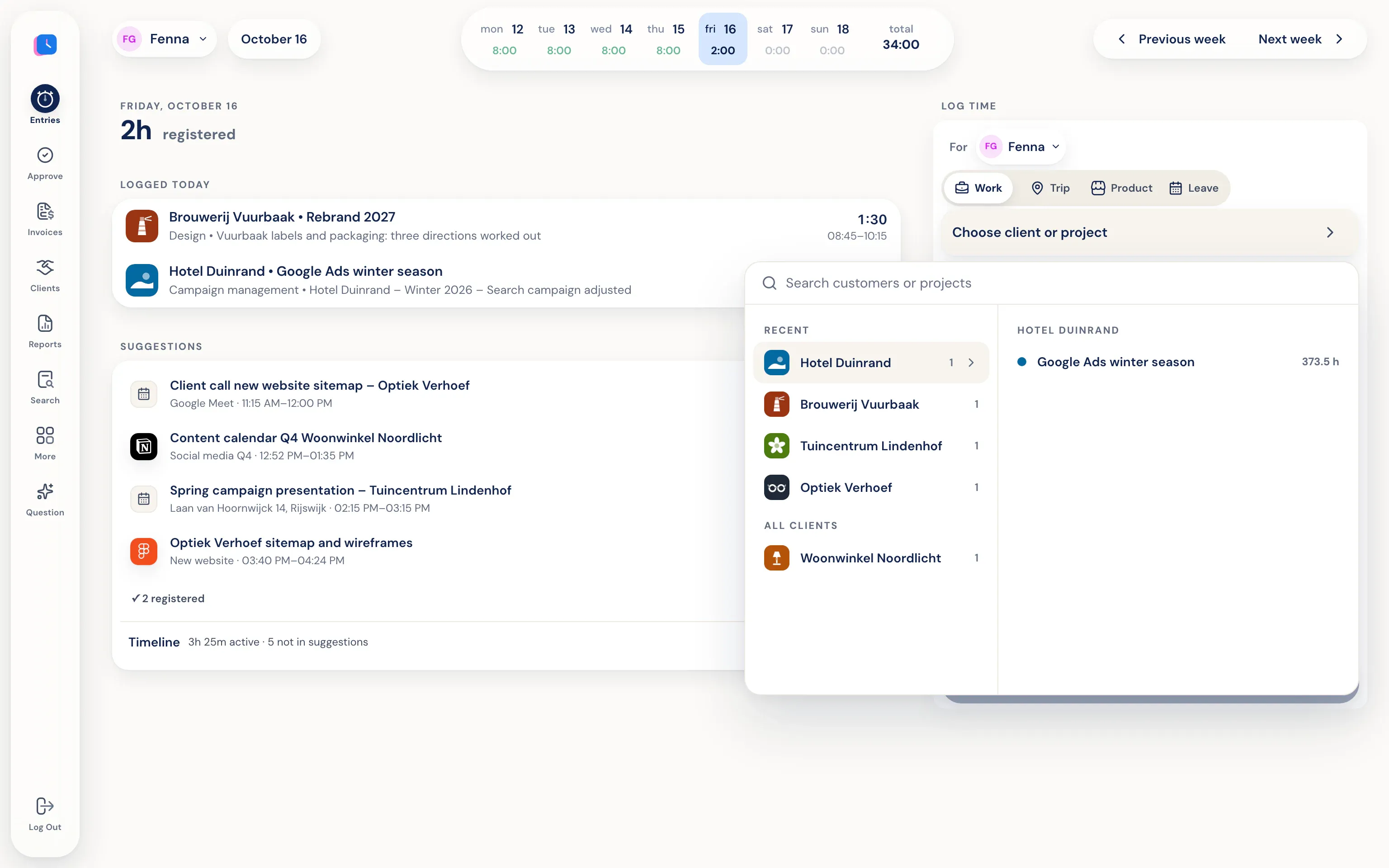
Half5 flips that around. The app keeps track of what you were working on and turns it into suggestions. You pick what counts as work and save it. What you don’t save never becomes a logged hour, and no one else sees it.
The same records on every device
You log time in one account, on whichever device you’re using. Each device adds what it can see:
- Desktop app for macOS and Windows: programs, websites, files, git commits, and AI sessions show up as work blocks on your Timeline.
- Phone app for iPhone and Android: mileage and visits, plus logging on the go. With Half5 Belletjes on Android, business calls are added too.
- Web: log time, approve, invoice, and run reports in your browser.
- Calendar: events from Google Calendar or Outlook show up as suggestions.
From hours to invoice
Each hour in Half5 is linked to a client, project, and activity, with a description. That means you can do more than just count hours. A manager can approve hours by week, and from approved hours you create draft invoices for each client. Send invoices from Half5, or pass them to Moneybird, WeFact, e-Boekhouden, or Exact Online.
In the reports you see where time went by client, project, employee, and activity, and what’s still waiting to be invoiced. Export to PDF, Excel, or CSV.
Private stays private
The activity on your Timeline is encrypted on your device. Your employer, manager, and Half5’s server can’t access it. No screenshots are taken and no keystrokes are recorded. Your manager only sees the hours, mileage, and leave you log. Learn more in the trust center.
Hours, mileage, and leave in one place.
-
Suggestions from your workday
From work blocks, calendar events, visits, and AI sessions, already matched to a client or project. Included in Premium.
-
Mileage on your phone
The app detects car trips and only asks for what your vehicle needs for tax records.
-
Approve and invoice
Weekly overview by employee, four-eyes approval, and draft invoices from approved hours.
Frequently asked questions
Which devices does Half5 work on?
On the web, with desktop apps for macOS and Windows, and apps for iPhone and Android. Linux isn’t supported. Only the desktop app can recognize programs and websites.
Do I have to start a timer?
No. Half5 doesn’t use a stopwatch. You log time afterward, with suggestions from your Timeline, calendar, and mileage. You can also add hours manually.
What does the app cost?
You pay per user per month; prices are on the pricing page. The automatic Timeline with suggestions is part of Premium. The first 14 days are free, no credit card required.
Which languages is Half5 available in?
Dutch, English, German, and French. Each team member can pick their own language.
More about Half5
- Automatic time tracking Your Timeline suggests hours—you're in control
- Time Tracking for Freelancers Hours, mileage, and invoices for the self-employed
- Time tracking for teams Weekly approval, departments, and invoices
- Mileage tracker app Trips and miles prepared for you
- How Half5 works A step-by-step tour of the app
- Download the apps Desktop, iPhone, and Android