You connect by signing in to Moneybird and choosing an administration. Half5 then imports your contacts, projects, ledger accounts, and VAT rates. If you update one in Moneybird, Half5 updates its copy.
1
Moneybird data in Half5
Your team logs hours on the contacts and projects already in Moneybird.
2
Approve week
A manager approves or rejects each person's submitted hours. Managers only see registered hours, never anyone's timeline.
3
Draft in Moneybird
The draft invoice is in Moneybird. You review and send it.
What carries over
What the Moneybird integration handles.
Create draft invoices from an hours report: one per client, with only billable hours that haven’t been invoiced yet. If your organization uses approval, only approved hours count.
Ledger accounts and VAT
Invoice lines use the chart of accounts and VAT rates from your Moneybird setup. International clients get the VAT treatment for their country.
Rules your way
Choose one line per time entry or a single combined line, and select which details—description, activity, project, employee—are shown. Add a discount before sending.
Send and payment
Send the invoice by email through Moneybird or mark it as sent yourself. Once it's paid in Moneybird, Half5 marks it paid too.
Hours are never billed twice
Hours on an invoice are tied to it. If you delete a draft, you choose whether those hours become billable again.
In the app
Here’s how it looks in Half5.
From hours report to Moneybird invoice
Filter the report by period, client, or project and create draft invoices. Half5 makes one draft per client.
Only billable hours not yet invoiced
You send via Moneybird or mark as sent
Payment status syncs back from Moneybird
One set of clients and projects
The integration settings show which data is synced and when the last sync happened.
Contacts and projects from Moneybird
Changes in Moneybird sync automatically to Half5
New customers in Half5 sync to Moneybird
Frequently asked questions
How do I connect my time tracking to Moneybird?
You connect by signing in to Moneybird and choosing an administration. Half5 then imports your contacts, projects, ledger accounts, and VAT rates. If you update one in Moneybird, Half5 updates its copy.
Which hours are sent to Moneybird?
Create draft invoices from an hours report: one per client, with only billable hours that haven’t been invoiced yet. If your organization uses approval, only approved hours count.
Can an hour be invoiced twice?
Hours on an invoice are tied to it. If you delete a draft, you choose whether those hours become billable again.
Which plan includes the Moneybird integration?
Available in Basic and Premium. First 14 days free.
Your timeline doesn't go anywhere. It's end-to-end encrypted on your own devices. Your employer, your manager, and Half5 can't open it, and no integration gets access. Only customer data and invoices with submitted hours are sent to Moneybird.
 Moneybird · Live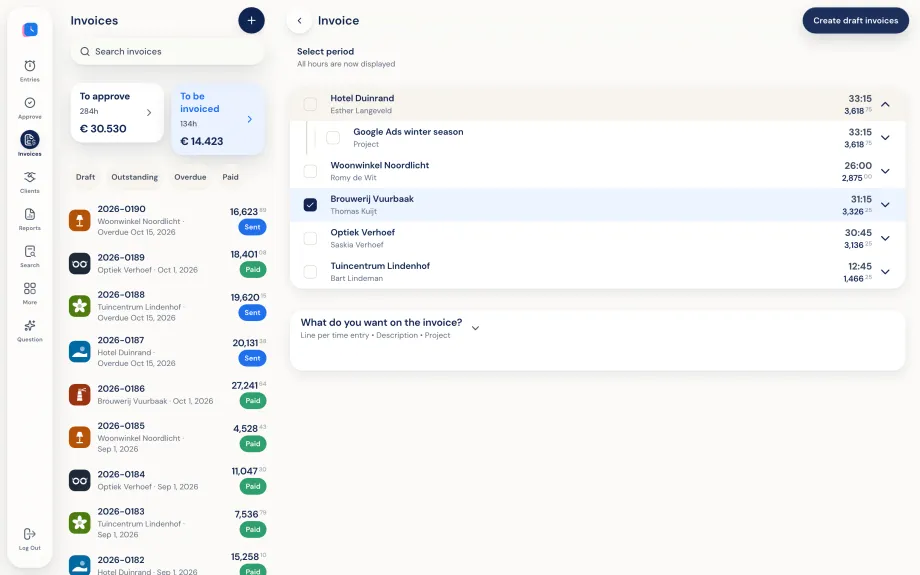
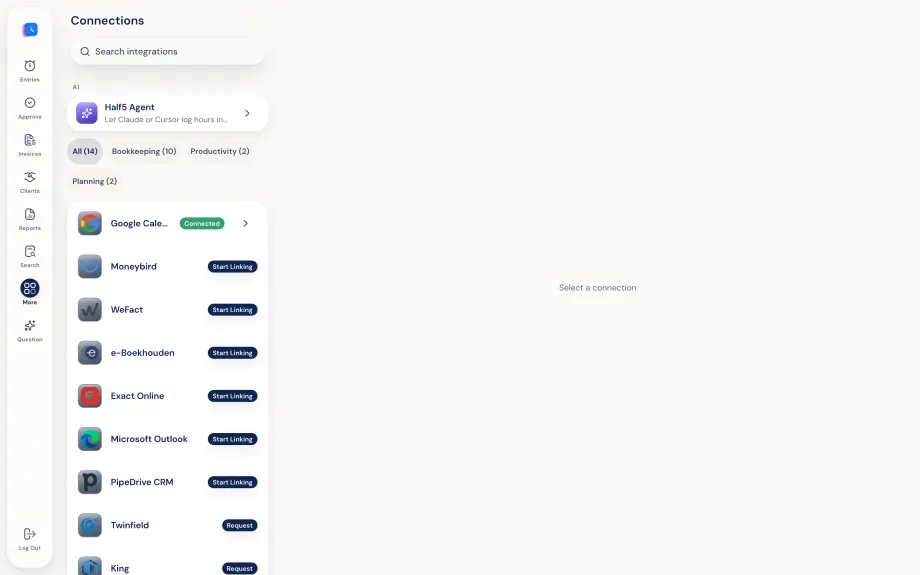

 WeFact
  e-Boekhouden
  Exact Online
  Pipedrive CRM
  Twinfield On request
  King On request
  Visma On request
  SnelStart On request
  Yuki On request
  Minox On request
  Teamleader On request
  QuickBooks On request
  Xero On request
  FreshBooks On request
  Zoho Books On request